
ASSINATURA DO WORDPRESS
Integrações de assinatura do WordPress para REEID Translate
Explore a compatibilidade documentada com plugins de assinatura do WordPress, preservando funções, permissões, planos e regras de acesso.
COMPATIBILIDADE DE ASSINATURA
Navegue pelas integrações de assinatura do WordPress.
Encontre guias de compatibilidade publicados para plugins de assinatura e suporte a registro, conta e conteúdo multilíngue voltado ao membro.

VikRestaurants Table Reservations and Take-Away
VikRestaurants Table Reservations and Take-Away — Provides table reservations and take-away/delivery ordering functionality for restaurants (including front-end booking/order flows and back-end management).
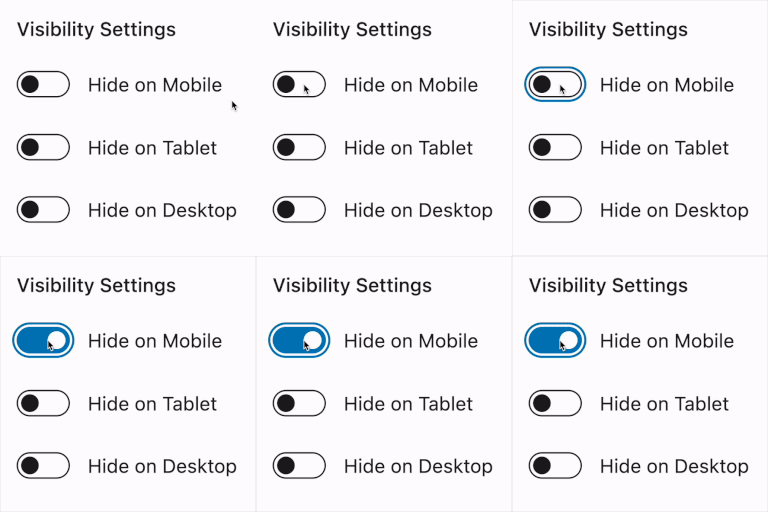
Visibility Controls for Editor Blocks
Visibility Controls for Editor Blocks — Adds native visibility settings in the WordPress block editor sidebar for Gutenberg blocks, allowing blocks to be hidden or shown based on device type (mobile/tablet/desktop).

Wallkit Subscriptions & Paywall Plugin for WordPress
Wallkit Subscriptions & Paywall Plugin for WordPress — Content access control and paywall enforcement for membership-based publishers

Wbcom Designs – BuddyPress Member Reviews
Wbcom Designs – BuddyPress Member Reviews — Integrates with BuddyPress and BuddyBoss member profiles to provide a dedicated Reviews tab for user-to-user feedback.

Wbcom Designs – Private Community for BuddyPress
Wbcom Designs – Private Community for BuddyPress — BuddyPress-specific access control for creating private or members-only communities

Web3 Access
Web3 Access — Restricts access to entire Pages, Posts, and custom content types based on wallet ownership or transaction history.

WebEffortless Membership Manager
WebEffortless Membership Manager — WooCommerce membership plan assignment via multiple access methods (e.g., product purchase linkage, free registration tiers, logged-in user access, and manual/invite-only assignment).

Webvriend – Custom login screen
Webvriend – Custom login screen — {"task": "Research factual plugin behavior for compatibility context only. Do not extract translation-surface observations.", "plugin_identity": {"name": "Webvriend – Custom login screen", "slug": "webvriend-wp-login", "homepage_url": "https://www.webvriend.nl/", "plugin_url": "https://www.webvriend.nl/"}, "official_search_domains": ["webvriend.nl", "wordpress.org", "plugins.svn.wordpress.org"], "rules": ["Return one JSON object only.", "Use only facts supported by supplied plugin evidence or web research from the allowed official domains.", "Use web search only when supplied evidence is insufficient.", "For web research, use only first-party vendor/product documentation and WordPress.org sources within official_search_domains.", "Do not use reviews, blogs, forums, aggregators, search snippets, or third-party documentation as evidence.", "Do not invent plugin behavior, capabilities, settings, or integrations.", "Do not decide REEID compatibility, translation support, approval, or eligibility.", "Follow category_research.rules for what to investigate in this Integration Category.", "Return observations as an empty list.", "Return 4 to 8 concise high-value factual capabilities in features.", "Group related implementation details into broader capability statements.", "Prefer stable product capabilities over minor settings or repeated variations.", "Do not include ratings, installation counts, version requirements, or promotional claims.", "Use unknowns only for materially relevant facts that official evidence does not establish.", "seo_display_name must be the shortest distinctive search-facing product or brand identity that can be copied exactly as one contiguous phrase from plugin_identity.name. Preserve the exact capitalization, spelling, and punctuation used in plugin_identity.name. Never invent, rename, expand, normalize, lowercase, or substitute the plugin brand. Remove generic leading or trailing descriptors when a shorter distinctive product or brand phrase is present, including terms such as Plugin, WordPress Plugin, Page Builder, Website Builder, WooCommerce, Forms, SEO, Addons, Widgets, Templates, Booking, Membership, or similar category/marketing wording. The distinctive brand may appear at the beginning, middle, or end of plugin_identity.name; for example, a title shaped like generic description – Brand should return Brand when Brand is clearly the product identity. When a short distinctive acronym, product token, or branded abbreviation appears after a separator and clearly identifies the plugin, prefer that exact token over the preceding generic description; for example Database Addon for Contact Form 7 – CFDB7 should return CFDB7. Use plugin_identity.slug only as an identity clue, not as output text unless that exact casing and phrase also appears in plugin_identity.name. If no shorter distinctive product or brand phrase can be selected safely, return the full plugin_identity.name.", "seo_keyword_candidates must contain 2 to 4 concise plugin-specific identity phrases based on seo_display_name, plugin_identity.name, and plugin_identity.slug. When the slug corresponds to a brand or product phrase present in the official name, include that phrase as a candidate. Do not return generic category-only phrases and do not assert REEID compatibility, verification, translation support, or other unsupported state claims."], "category_research": {"integration_category": "Membership", "mode": "compatibility_only", "rules": ["Research factual membership-plugin behavior relevant to compatibility, including protected content, member areas, access rules, and account-facing rendering.", "This Integration Category is compatibility-only.", "Do not research, infer, or emit translation-surface observations.", "Return observations as an empty list.", "Use features and unknowns only for factual compatibility context."], "evidence_focus": {"integration_category": "Membership", "look_for_literal_terms": []}, "output_schema": {"observations": [{"text": "", "evidence": "", "source_url": ""}], "features": [], "unknowns": [], "seo_display_name": "", "seo_keyword_candidates": []}, "evidence": {"description": "In this plugin we build a custom WordPress login screen.", "readme_text": "=== Webvriend - Custom login screen ===\nContributors: Webvriend\nRequires at Least: 6.0.0\nTested up to: 7.0\nTags: webvriend\nStable tag: 2.2.0\nLicense: GPLv2 or later\nLicense URI:http://www.gnu.org/licenses/gpl-3.0.html\n\nIn this plugin we build a custom WordPress login screen\n\n== Description ==\n\nIn this plugin we build a custom WordPress login screen."}}}

Wild Apricot Login
Wild Apricot Login — Restricts WordPress content to Wild Apricot members via a shortcode wrapper that conditionally renders the enclosed content only to authorized users.

Wine Club Connection
Wine Club Connection — WooCommerce-based recurring membership system creation

WP Approve User
WP Approve User — User registration approval workflow: provides the ability to approve or reject user registrations.

WP Customer Area
WP Customer Area provides a secure customer area for logged-in users, with private pages and files that can be assigned to selected users.

WP Delete User Accounts
WP Delete User Accounts — Enables non-administrator users to manually delete their own accounts via a profile button or shortcode

WP Discourse
WP Discourse — Bidirectional SSO integration allowing WordPress to act as a DiscourseConnect provider or using Discourse as a WordPress authentication source

WP eMember Integration for WooCommerce
WP eMember Integration for WooCommerce — , integrates WooCommerce checkout with WP eMember membership levels

WP Frontend Delete Account
WP Frontend Delete Account — Provides a frontend account-deletion flow for WooCommerce customers from the My Account area, with a Delete Account tab created automatically.

WP Fusion Lite – Marketing Automation and CRM Integration for WordPress
WP Fusion Lite – Marketing Automation and CRM Integration for WordPress — Synchronizes registered WordPress users with CRM contact records, including name and email.

WP Multisite User Sync/Unsync
WP Multisite User Sync/Unsync — Synchronizes user accounts between sites within a WordPress Multisite network.

WP Social AutoConnect
WP Social AutoConnect — Supports WordPress and BuddyPress integration for social login.

WP Telegram Login & Register
WP Telegram Login & Register — Enables user login and registration via Telegram account integration

WP User Groups
WP User Groups — Categorizes WordPress users using custom taxonomies and terms
WP User Profile Restriction
WP User Profile Restriction — Granular role-based restrictions for profile editing capabilities

WP User Profiles
WP User Profiles — Provides a structured interface for editing user profiles with four top-level sections: Profile, Account, Options, and Permissions.

WP User Signups
WP User Signups — Provides a dedicated WordPress admin interface for viewing and managing pending user sign-ups.