
WORDPRESS NAVIGATION
WordPress navigation integrations for REEID Translate
Explore documented compatibility with WordPress navigation and menu plugins while preserving menu hierarchy, destinations and presentation.
NAVIGATION COMPATIBILITY
Browse WordPress navigation integrations.
Find published compatibility guides for navigation plugins and supported multilingual menu labels and visitor-facing navigation text.

CC-Redirects
CC-Redirects — Supports Apache-style redirect syntax with relative paths from the website root.
cclin Smart Table of Contents
cclin Smart Table of Contents — Automatically extracts and structures hierarchical Table of Contents from H2 to H6 headings with configurable levels.

Change Author Link Structure
Change Author Link Structure — Hides usernames in author permalinks by replacing them with the author's ID

Classic Menu Accessible (A11y)
Classic Menu Accessible (A11y) — Enhances native WordPress classic menu dropdowns with WCAG 2.2 AA, RGAA, and AnySurfer compliance.

Classic Menu Block
Classic Menu Block — Renders classic WordPress menu data inside the Navigation block for backward compatibility.

Classic Menu in Navigation Block
Classic Menu in Navigation Block — Renders classic WordPress menus within the native Navigation block in Full Site Editing (FSE) themes

Classic Menu Sync for Block
Classic Menu Sync for Block — Synchronizes classic WordPress menus with Navigation blocks using the native WP_Classic_To_Block_Menu_Converter

Classic Menus for Block Themes
Classic Menus for Block Themes — , restores the legacy 'Appearance > Menus' management interface within block-based WordPress themes

Clean Menus
Clean Menus — Filters navigation menu items based on post status to exclude drafts, pending reviews, future posts, private entries, and trashed content.

CleanLinks
CleanLinks — Creates branded short links by cloaking long URLs under the site's own domain.

Click to Chat – HoliThemes
Click to Chat – HoliThemes adds WhatsApp chat entry points with multiple launch targets, trigger-based greetings, form collection, WooCommerce messaging, and analytics click events.
Clickable Sidebar Menu
Clickable Sidebar Menu — Creates customizable sidebar menus with support for multiple levels of submenus.

ClipLink
ClipLink — Creates custom short links using a specific URL structure (e.g., /go/example)
CM Table Of Contents – Clear navigation for better content discovery
CM Table Of Contents – Clear navigation for better content discovery — Generates automatic tables of contents for posts, pages, and custom post types based on header tags (h1-h6), div/span elements, or CSS classes.

CMS Tree Page View – Reorder Pages with a Drag-and-Drop Tree
WordPress admin plugin for drag-and-drop tree ordering of pages, posts, products, and other public post types, with in-tree edit, view, add, search, and live preview actions.
Coaderhub Table of Contents
Coaderhub Table of Contents — Automatically generates navigation tables from H2-H6 headings with configurable minimum heading thresholds.
Collapsing Archives
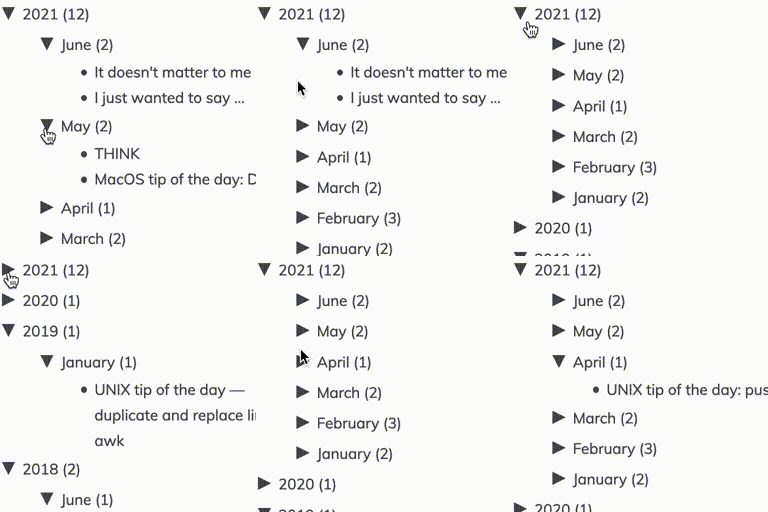
Collapsing Archives — Provides a collapsible archive navigation UI (by year and/or month) that dynamically expands/collapses the archive listing using JavaScript.
Collapsing Categories
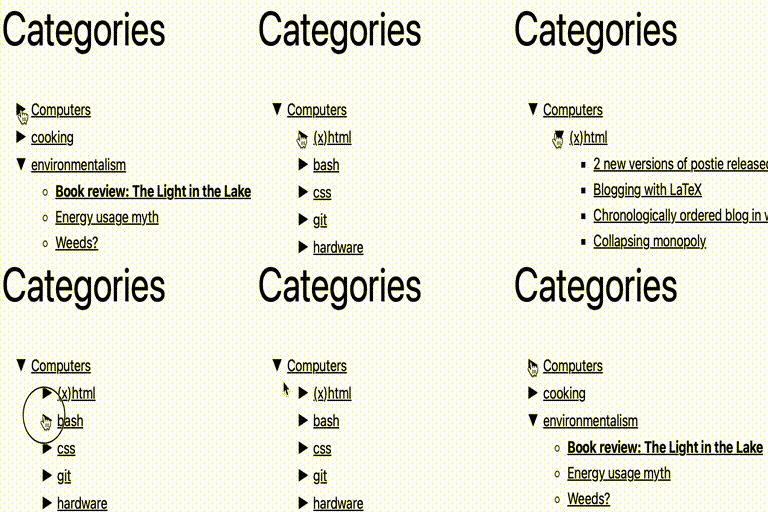
Collapsing Categories — Creates an expandable hierarchy of categories and subcategories for navigation.

Colorful Categories
Colorful Categories — Provides a custom widget for displaying categories with individual color assignments
Come2theweb Multi-Column Menu
Come2theweb Multi-Column Menu — Creates multi-column dropdown menus using the native WordPress Appearance > Menus interface

Compact Archives
Compact Archives — Displays monthly post archives in compact formats (initials, block, numeric) instead of long lists
Conditional redirect based on time
Conditional redirect based on time — time-based conditional redirection for website visitors

Conditional Widgets
Conditional Widgets — Adds per-widget visibility controls in the Widgets panel for choosing whether a widget is shown or hidden.

Contact Information Widget
Contact Information Widget — Provides a widget (“Contact Information Widget”) that can be added to widgetable areas such as sidebars, footers, and pages.