

WOOCOMMERCE
WooCommerce | Compatibilità con REEID Translate
REEID ha testato WooCommerce con REEID Translate. La compatibilità è stata verificata, mentre al momento non è stata pubblicata alcuna superficie di traduzione specifica rivolta ai visitatori per questa integrazione.
COMPATIBILITÀ VERIFICATA
La compatibilità di WooCommerce è stata verificata.
L’integrazione ha superato i test di compatibilità di REEID. La struttura, la configurazione e le funzionalità controllate dal plugin rimangono separate da qualsiasi ambito di traduzione a livello di campo.
COMPATIBILITÀ VERIFICATA
Questa integrazione è stata testata e verificata da REEID.
AMBITO A LIVELLO DI CAMPO
Al momento non sono stati pubblicati campi di traduzione specifici rivolti ai visitatori per questa integrazione verificata.
PROVE D’INTEGRAZIONE
La compatibilità verificata e le funzionalità del plugin sono documentate separatamente dalle affermazioni relative alla traduzione a livello di campo.
COMPATIBILITÀ VERIFICATA
Come viene esaminata la compatibilità di WooCommerce
01 · Testare la compatibilità dell’integrazione
Confermare che WooCommerce e REEID Translate possono operare insieme senza assegnare dichiarazioni di traduzione non supportate.
02 · Esaminare il comportamento controllato dal plugin
Mantenere la struttura, la configurazione, la logica e il comportamento runtime del plugin sotto il controllo di WooCommerce.
03 · Identificare i valori rivolti ai visitatori
Valutare i valori umani concreti separatamente dalla capacità funzionale del plugin.
04 · Pubblicare solo l’ambito confermato
Elencare il supporto alla traduzione a livello di campo solo quando i valori specifici rivolti ai visitatori sono stati stabiliti e validati.
INTELLIGENZA DEL PLUGIN
Ciò che dimostra l’evidenza ufficiale del plugin
Capacità del plugin
- WooCommerce è la piattaforma di e-commerce open source per WordPress.
- WooCommerce fornisce blocchi di prodotto per personalizzare le pagine dei prodotti.
- WooCommerce supporta la vendita di abbonamenti, prenotazioni e membership.
- WooCommerce include un cruscotto centrale per monitorare le metriche di performance del negozio.
- WooCommerce supporta i pagamenti tramite WooPayments e oltre 100 gateway di pagamento.
- WooCommerce offre un’API REST e webhook per integrare servizi.
Caratteristiche distintive
Blocchi di prodotto modulari per una facile personalizzazione, ampio supporto ai gateway di pagamento incluso WooPayments, stampa integrata delle etichette di spedizione e integrazioni con corrieri, estensioni approvate dagli sviluppatori per abbonamenti e membership, una potente API REST e hook per la personalizzazione, oltre a una vasta comunità globale con traduzioni in molte lingue.
Contenuto dinamico
Le prove indicano contenuti dinamici come pagine prodotto, esperienze nel carrello della spesa e notifiche dell’app mobile, ma non forniscono esempi espliciti di testo dinamico rivolto ai visitatori. La rilevanza della traduzione dei contenuti dinamici è plausibile ma non è dettagliata esplicitamente.
SEO e metadati
Viene menzionato esplicitamente il vantaggio SEO, suggerendo il supporto alla traduzione dei metadati SEO, ma nell’evidenza non sono forniti esempi concreti di testo SEO.
URL e navigazione
Non è fornita evidenza esplicita di contenuti testuali relativi a URL o navigazione; la rilevanza della traduzione di URL e navigazione rimane incerta.
Moduli e commercio
Il plugin supporta moduli di e-commerce come quelli di checkout e pagamento, con contenuti rivolti ai visitatori tra cui etichette dei metodi di pagamento e messaggi. Tuttavia, nell’evidenza non sono citati specifici etichette o messaggi dei campi dei moduli.
CONFINI DEI CONTENUTI
La compatibilità verificata non implica un ambito di traduzione illimitato.
WooCommerce è stato testato con REEID Translate, ma al momento non è stata pubblicata alcuna superficie di traduzione specifica rivolta ai visitatori per questa integrazione.
Le funzionalità del plugin e il supporto alla traduzione a livello di campo rimangono affermazioni di compatibilità separate.
LIMITAZIONI & QA
Note di verifica
- Non è stata stabilita alcuna superficie di traduzione rivolta ai visitatori per questa integrazione.
DOMANDE COMUNI
FAQ su WooCommerce e REEID Translate.
REIID Translate funziona con WooCommerce?
Sì. REEID ha testato e verificato la compatibilità con WooCommerce.
Quali campi di WooCommerce sono confermati per la traduzione?
Al momento non sono stati pubblicati campi specifici rivolti ai visitatori come ambito di traduzione confermato per questa integrazione.
Cosa significa compatibilità verificata per WooCommerce?
Significa che REEID ha testato con successo l’integrazione. Il supporto alla traduzione a livello di campo è documentato separatamente ed è pubblicato solo quando i valori specifici rivolti ai visitatori sono stati validati.
GUIDE CORRELATE
Continuare attraverso la libreria della compatibilità.
WOOCOMMERCE INTEGRAZIONI
Sfogliare le integrazioni di WooCommerce.
Esplorare le guide di compatibilità pubblicate per le estensioni di WooCommerce, i gateway di pagamento e i plugin correlati utilizzati insieme a REEID Translate.

WC Multiple Email Recipients
WC Multiple Email Recipients — Adds up to 25 additional email addresses for WooCommerce notification emails.

WC MyParcel Belgium
WC MyParcel Belgium — Integrates MyParcel Belgium delivery options into the WooCommerce checkout.
WC Order Split
WC Order Split — Splits WooCommerce orders into multiple new orders based on selected items.

WC Order Test
WC Order Test — Provides a testing payment gateway for WooCommerce.
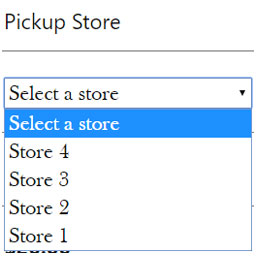
WC Pickup Store
WC Pickup Store — Provides a custom shipping method for local pickup using a dedicated store post type.

WC Price History
WC Price History — Tracks WooCommerce product price history and displays the lowest price from the last 30 days.
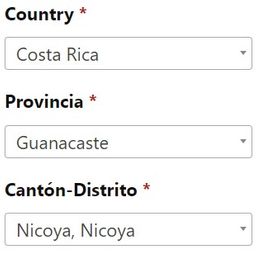
WC Provincia Canton Distrito
WC Provincia Canton Distrito — Populates custom state, city, and postcode fields for WooCommerce checkout, account, and shipping calculator forms.

WC Quantity Style
WC Quantity Style — Replaces default WooCommerce quantity input arrows with separate plus and minus buttons.

WC Recurring Invoice
WC Recurring Invoice — Generates PDF invoices for WooCommerce orders, supporting both recurring and non-recurring transactions.

WC Restore the Purchased Items Column in Orders Page
WC Restore the Purchased Items Column in Orders Page — Restores the 'Purchased Items' column in the WooCommerce orders page.

WC Search Orders By Product
WC Search Orders By Product — Automatically adds product search, product type, and product category filter dropdowns to the WooCommerce Orders screen.

WC Shop Sync – Square Payment Gateway and Product Synchronization for WooCommerce
WC Shop Sync – Square Payment Gateway and Product Synchronization for WooCommerce — Connect WooCommerce with Square

WC Solana Pay
WC Solana Pay — A WooCommerce payment gateway that accepts cryptocurrency and stablecoin payments including SOL, USDT, USDC, PYUSD, EURC, and EUROe.

WC Tiered Shipping
WC Tiered Shipping — A tiered flat rate shipping option for WooCommerce carts

WC To Invoicing.plus
WC To Invoicing.plus — WooCommerce integration for legal invoice generation
WC Tracking Status
WC Tracking Status — Adds custom tracking statuses for WooCommerce orders after they reach the 'completed' state.

WC Variations Radio Buttons
WC Variations Radio Buttons — Displays WooCommerce product variations using radio buttons instead of dropdowns.

WC Vendors – WooCommerce Multivendor, WooCommerce Marketplace, Product Vendors
WC Vendors – WooCommerce Multivendor, WooCommerce Marketplace, Product Vendors — Lets vendors add new values (attribute terms) to existing WooCommerce product attributes via the vendor product editing form.

WC Weight Meter
WC Weight Meter — WooCommerce plugin that tracks the total weight of items in the cart

WC-AC Hook
WC-AC Hook — Automatically creates or updates ActiveCampaign contacts when a WooCommerce order is created or status changes.

WCAPF – Ajax Product Filter for WooCommerce
WCAPF – Ajax Product Filter for WooCommerce adds AJAX filtering for WooCommerce stores. It supports product attribute filtering for product attributes.

WCB | WP Configurator Builder – Product Configurators Made Simple
WCB | WP Configurator Builder – Product Configurators Made Simple — Creates Gutenberg-based product configurators with a drag-and-drop form builder interface

WCFM – Multivendor Marketplace REST API for WooCommerce
WCFM – Multivendor Marketplace REST API for WooCommerce — Provides REST API endpoints for creating, reading, updating, and deleting products in a multivendor marketplace.

Wcik Pennsylvania Shipping
Wcik Pennsylvania Shipping — {"task": "Research and extract factual plugin content evidence for the specified Integration Category. Do not decide REEID support or compatibility.", "plugin_identity": {"name": "Wcik Pennsylvania Shipping", "slug": "wcik-pennsylvania-shipping", "homepage_url": "http://imran1.com/woo-checkout-pennsylvania-based-surcharge-fee-my-clients-custom-solution/", "plugin_url": "http://imran1.com/woo-checkout-pennsylvania-based-surcharge-fee-my-clients-custom-solution/"}, "official_search_domains": ["imran1.com", "wordpress.org", "plugins.svn.wordpress.org"], "rules": ["Return one JSON object only.", "Use only facts supported by supplied plugin evidence or web research from the allowed official domains.", "Use web search when supplied evidence does not explicitly establish the evidence_focus values.", "For web research, use only first-party vendor/product documentation and WordPress.org sources within official_search_domains.", "Do not use reviews, blogs, forums, aggregators, search snippets, or third-party documentation as evidence.", "Do not invent content surfaces, fields, settings, or behavior.", "Do not decide compatibility, translation support, approval, or eligibility.", "Do not assign canonical surface identifiers or canonical surface types.", "Do not assign translation_candidate or similar decision fields.", "Do not use REEID capability contracts, blueprints, category profiles, or internal rules to infer support.", "Follow category_research.rules for what to investigate in this Integration Category.", "If evidence_focus is supplied, investigate every look_for_literal_terms value independently; do not stop after finding only some of them.", "For every evidence_focus value, search the allowed official sources for explicit supporting documentation before concluding that it is unavailable.", "A translation-category result is incomplete if any evidence_focus value has been neither supported by an observation nor explicitly accounted for in unknowns.", "For each evidence_focus value that remains unsupported after research, add a concise unknowns entry stating that official evidence for that value was not found.", "Evidence focus terms are search hints only. They are not proof that the plugin contains, manages, exposes, or supports those values.", "Never output an evidence focus term as an observation unless supplied evidence or an official source explicitly names that textual value.", "The supplied description, readme, FAQ, installation text, metadata, and documentation are evidence sources only; never treat their own prose as plugin-managed website content.", "Extract only literal evidence for explicitly named website textual values.", "text must be an exact phrase copied from the supporting supplied evidence or official source. Never invent, normalize, rename, summarize, classify, or semantically reinterpret it.", "evidence must be an exact supporting sentence or passage copied from the supplied evidence or official source and must contain or directly establish text.", "For translation-category observations, inspect supplied official evidence first. When the supporting passage exists in supplied evidence, source_url may be empty because provenance is validated against that official corpus. Use web research only when supplied evidence does not establish the value; for web-researched evidence, source_url must be the exact official page URL containing the evidence.", "Do not infer location, ownership, configurability, visibility, translation relevance, canonical type, or support.", "Do not create observations from documentation prose merely because that prose itself contains human-readable text.", "Do not create observations from FAQ copy, installation instructions, privacy notices, plugin metadata, requirements, ratings, marketing copy, or from the mere existence of containers, screens, forms, product pages, carts, dashboards, integrations, APIs, systems, widgets, blocks, or features. Official documentation or feature prose may support an observation only when it explicitly names or quotes the actual website textual value being documented.", "If the evidence does not explicitly name a website textual value, return no observation for it.", "features are for a concise human-readable capability summary, not a documentation inventory.", "Return 4 to 8 high-value factual capabilities that best explain what the plugin does.", "Group related settings and implementation details into broader capability statements instead of listing individual settings.", "Prioritize capabilities that help a prospective user understand the plugin's main functionality, important integrations, and distinctive behavior.", "Prefer stable product capabilities over minor configuration options, UI settings, technical implementation details, or repeated variations of the same capability.", "Do not include ratings, installation counts, version requirements, marketing claims, or promotional language.", "Do not repeat the same capability in different wording.", "Use concise factual sentences suitable for a public integration directory and search indexing.", "features may contain concise factual capabilities directly stated by the evidence, but features are not translation evidence.", "unknowns may record areas where the evidence does not explicitly establish a textual value.", "seo_display_name must be the shortest distinctive search-facing product or brand identity that can be copied exactly as one contiguous phrase from plugin_identity.name. Preserve the exact capitalization, spelling, and punctuation used in plugin_identity.name. Never invent, rename, expand, normalize, lowercase, or substitute the plugin brand. Remove generic leading or trailing descriptors when a shorter distinctive product or brand phrase is present, including terms such as Plugin, WordPress Plugin, Page Builder, Website Builder, WooCommerce, Forms, SEO, Addons, Widgets, Templates, Booking, Membership, or similar category/marketing wording. The distinctive brand may appear at the beginning, middle, or end of plugin_identity.name; for example, a title shaped like generic description – Brand should return Brand when Brand is clearly the product identity. When a short distinctive acronym, product token, or branded abbreviation appears after a separator and clearly identifies the plugin, prefer that exact token over the preceding generic description; for example Database Addon for Contact Form 7 – CFDB7 should return CFDB7. Use plugin_identity.slug only as an identity clue, not as output text unless that exact casing and phrase also appears in plugin_identity.name. If no shorter distinctive product or brand phrase can be selected safely, return the full plugin_identity.name.", "seo_keyword_candidates must contain 2 to 4 concise plugin-specific identity phrases based on seo_display_name, plugin_identity.name, and plugin_identity.slug. When the slug corresponds to a brand or product phrase present in the official name, include that phrase as a candidate. Do not return generic category-only phrases and do not assert REEID compatibility, verification, translation support, or other unsupported state claims."], "category_research": {"integration_category": "WooCommerce", "mode": "translation", "rules": ["Actively research official WooCommerce documentation for individual product text values managed by WooCommerce.", "Prioritize product titles or names, product descriptions including short or long descriptions, and product attributes including names, labels, options, or values.", "A product, product page, product block, catalog, variation, or attribute system is not itself a textual value. Extract an observation only when official evidence explicitly names or quotes the product text-bearing value."]}, "evidence_focus": {"integration_category": "WooCommerce", "look_for_literal_terms": ["product title", "product name", "product description", "long description", "short description", "product attribute", "attribute label", "attribute name", "attribute option", "attribute value", "attribute values", "name of an attribute", "value of an attribute", "values of an attribute", "values of the attributes"]}, "output_schema": {"observations": [{"text": "", "evidence": "", "source_url": ""}], "features": [], "unknowns": [], "seo_display_name": "", "seo_keyword_candidates": []}, "evidence": {"description": "WooCommerce Plugin that adds checkout fields and surcharge for shipping to pennsylvania state. A Custom solution for one of my client, On checkout page when you will choose billing or shipping state to pennsylvania, the additional fields will be displayed and he surcharge fee will be added to the order totals.\n Minimum Requirements\n WooCommerce 7.0 or greater\n WordPress 6.5 or greater\n PHP version 8.2 or greater (PHP 8.1 or greater is recommended)\n MySQL version 5.6 or greater (MySQL 5.6 is recommended)\n Automatic installation\n Log in to your WordPress dashboard\n Navigate to the Plugins menu and click Add New.\n Search and locate ‘Wcik Pennsylvania Shipping’.\n Click ‘Install Now’\n Manual installation\n The manual installation method involves downloading Wcik Pennsylvania Shipping’ plugin and uploading it to your webserver via FTP application. You may find more\n instructions on how to do this here (https://codex.wordpress.org/Managing_Plugins#Manual_Plugin_Installation).", "sections": {"faq": "Can I go back to WooCommerce default settings at a later point?\n Yes. you can uninstall the plugin at any stage.", "readme_text": "===Wcik Pennsylvania Shipping===\nContributors: awanhrp\nlink: https://codeinform.com \nTags: WooCommere Pennsylvania Shipping checkout fields and surcharge\nRequires at least: 6.0 \nTested up to: 6.8.0\nRequires PHP: 8.2 \nStable tag: 1.4.0\nLicense: GPLv2 or later \nLicense URI: http://www.gnu.org/licenses/gpl-2.0.htmlWcik\n\n== Description ==\nWooCommerce Plugin that adds checkout fields and surcharge for shipping to pennsylvania state. A Custom solution for one of my client, On checkout page when you will choose billing or shipping state to pennsylvania, the additional fields will be displayed and he surcharge fee will be added to the order totals.\n\n= Minimum Requirements =\n* WooCommerce 7.0 or greater\n* WordPress 6.5 or greater\n* PHP version 8.2 or greater (PHP 8.1 or greater is recommended)\n* MySQL version 5.6 or greater (MySQL 5.6 is recommended)\n\n= Automatic installation =\n1. Log in to your WordPress dashboard\n2. Navigate to the Plugins menu and click Add New.\n3. Search and locate 'Wcik Pennsylvania Shipping'.\n4. Click 'Install Now'\n\n= Manual installation =\nThe manual installation method involves downloading Wcik Pennsylvania Shipping' plugin and uploading it to your webserver via FTP application. You may find more \n\ninstructions on how to do this here (http://codex.wordpress.org/Managing_Plugins#Manual_Plugin_Installation).\n\n== Frequently Asked Questions ==\n= Can I go back to WooCommerce default settings at a later point? =\nYes. you can uninstall the plugin at any stage. \n\n== Screenshots ==\n1. Manufacturers\n\n== Change log ==\n= 1.0.0 =\n* First Release\n* WooCommerce Plugin that adds checkout fields and surcharge for shipping to pennsylvania state"}}}
INTEGRAZIONE VERIFICATA
Utilizzare WooCommerce con un confine di compatibilità multilingue documentato.
REEID ha verificato la compatibilità dell’integrazione mantenendo le funzionalità del plugin separate dalle affermazioni non confermate di traduzione a livello di campo.
I campi specifici di traduzione saranno elencati quando il loro ambito rivolto ai visitatori sarà stato stabilito e validato.