

WOOCOMMERCE
WooCommerce | REEID Translate 호환성
REEID은 WooCommerce를 REEID Translate와 함께 테스트했습니다. 호환이 확인되었습니다. 현재 이 통합에서 방문자에게 표시되는 특정 콘텐츠의 번역 여부는 아직 확정되지 않았습니다.
호환성 검증 완료
WooCommerce의 호환이 확인되었습니다.
이 통합은 REEID의 호환성 테스트를 통과했습니다. 플러그인의 구조, 설정 및 기능은 확정된 번역 지원과는 별개입니다.
호환성 검증 완료
이 통합은 REEID에 의해 테스트되고 검증되었습니다.
번역 지원
현재 이 통합에서 방문자에게 표시되는 특정 콘텐츠의 번역 여부는 아직 확정되지 않았습니다.
검증 세부사항
검증된 호환성과 플러그인 기능은 확정된 번역 지원과는 별도로 문서화되어 있습니다.
호환성 검증 완료
WooCommerce의 호환이 어떻게 검토되는지
01 · 통합의 호환성 테스트
WooCommerce와 REEID Translate가 서로 올바르게 작동할 수 있는지 확인합니다.
02 · 플러그인 동작 검토
플러그인의 구조, 설정, 로직 및 런타임 동작이 WooCommerce의 관리 하에 유지됨을 확인합니다.
03 · 번역 가능 콘텐츠 식별
방문자에게 표시되는 특정 인간이 읽을 수 있는 콘텐츠 중 번역이 필요할 수 있는 부분을 식별합니다.
04 · 확정된 지원 공개
방문자에게 표시되는 특정 콘텐츠가 식별되고 검증된 후에야 번역 지원을 공개합니다.
플러그인 정보
플러그인이 하는 일
플러그인 기능
- WooCommerce는 WordPress용 오픈소스 전자상거래 플랫폼입니다.
- WooCommerce은 제품 페이지를 맞춤설정할 수 있는 제품 블록을 제공합니다.
- WooCommerce는 구독, 예약 및 멤버십 판매를 지원합니다.
- WooCommerce에는 스토어 성과 지표를 모니터링하는 중앙 대시보드가 포함되어 있습니다.
- WooCommerce는 WooPayments 및 100여 개 이상의 결제 게이트웨이를 통한 결제를 지원합니다.
- WooCommerce는 서비스 연동을 위한 REST API와 웹훅을 제공합니다.
독특한 특징
쉬운 맞춤설정을 위한 모듈형 제품 블록, WooPayments를 포함한 광범위한 결제 게이트웨이 지원, 내장형 배송 라벨 인쇄 및 운송업체 연동, 개발자 검증을 거친 구독 및 멤버십 관련 확장 기능, 강력한 REST API와 커스터마이징을 위한 훅, 그리고 다국어 번역을 지원하는 대규모 글로벌 커뮤니티.
동적 콘텐츠
증거 자료는 제품 페이지, 장바구니 경험, 모바일 앱 알림 등 동적 콘텐츠를 시사하지만, 방문자에게 직접 노출되는 구체적인 동적 텍스트 사례는 제시되지 않았습니다. 동적 콘텐츠 번역의 관련성은 타당하나 명확히 상세히 언급되지는 않았습니다.
SEO 및 메타데이터
SEO 우위가 명시적으로 언급되어 있어 SEO 메타데이터 번역 지원을 암시하지만, 증거 자료에는 구체적인 SEO 메타데이터 텍스트 사례가 포함되어 있지 않습니다.
URL 및 탐색
URL이나 내비게이션 텍스트 콘텐츠에 대한 명시적 증거는 제시되지 않아 URL 및 내비게이션 번역의 관련성은 불확실합니다.
양식 및 상거래
플러그인은 체크아웃 및 결제 양식 등 전자상거래 관련 양식을 지원하며, 방문자에게 표시되는 결제 수단 라벨과 메시지도 포함됩니다. 그러나 증거 자료에는 구체적인 양식 필드 라벨이나 메시지가 인용되지 않았습니다.
TRANSLATION BOUNDARY
검증된 호환성이 모든 필드에 대한 번역 지원을 자동으로 보장하는 것은 아닙니다.
WooCommerce는 REEID Translate와 함께 테스트되었지만, 현재 이 통합에서 방문자에게 표시되는 특정 콘텐츠의 번역 여부는 아직 확정되지 않았습니다.
플러그인의 호환성과 확정된 번역 지원은 별도로 문서화되어 있습니다.
한계 및 품질 보증
검증 메모
- WooCommerce 제품 설정 페이지는 ProductsSettingsPageAdapter에서 무제한 get_pages() 호출로 인해 페이지 수가 많은 사이트에서는 메모리를 과도하게 소모할 수 있습니다.
- 해당 문제는 상위 개발팀에 보고되었으며, 이후 WooCommerce 개발팀에 의해 해결되었습니다:
- https://github.com/woocommerce/woocommerce/issues/69043
자주 묻는 질문
WooCommerce와 REEID Translate FAQ.
REEID Translate는 WooCommerce와 함께 작동합니까?
네. REEID은 WooCommerce와의 호환성을 테스트하고 검증했습니다.
WooCommerce 중 어떤 필드가 번역이 확정되었습니까?
현재 이 통합에서 방문자에게 표시되는 특정 필드의 번역 여부는 아직 확정되지 않았습니다.
검증된 호환성이 WooCommerce에 대해 무엇을 의미합니까?
이는 REEID이 WooCommerce를 REEID Translate와 함께 성공적으로 테스트했음을 의미합니다. 구체적인 번역 지원은 방문자에게 표시되는 콘텐츠가 식별되고 검증된 후 별도로 문서화됩니다.
관련 가이드
더 많은 호환성 가이드를 확인해 보세요.
WOOCOMMERCE 통합
WooCommerce 통합을 둘러봅니다.
WooCommerce 확장 기능, 결제 게이트웨이 및 관련 플러그인들이 REEID Translate과 함께 사용되는 경우에 대한 공개된 호환성 가이드를 살펴봅니다.

WC Multiple Email Recipients
WC Multiple Email Recipients — Adds up to 25 additional email addresses for WooCommerce notification emails.

WC MyParcel Belgium
WC MyParcel Belgium — Integrates MyParcel Belgium delivery options into the WooCommerce checkout.
WC Order Split
WC Order Split — Splits WooCommerce orders into multiple new orders based on selected items.

WC Order Test
WC Order Test — Provides a testing payment gateway for WooCommerce.
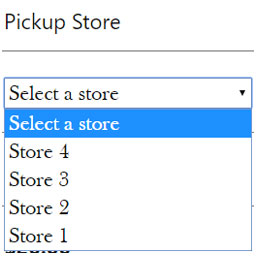
WC Pickup Store
WC Pickup Store — Provides a custom shipping method for local pickup using a dedicated store post type.

WC Price History
WC Price History — Tracks WooCommerce product price history and displays the lowest price from the last 30 days.
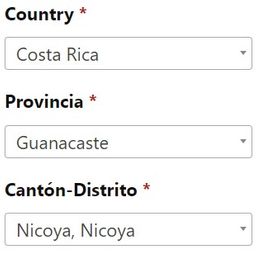
WC Provincia Canton Distrito
WC Provincia Canton Distrito — Populates custom state, city, and postcode fields for WooCommerce checkout, account, and shipping calculator forms.

WC Quantity Style
WC Quantity Style — Replaces default WooCommerce quantity input arrows with separate plus and minus buttons.

WC Recurring Invoice
WC Recurring Invoice — Generates PDF invoices for WooCommerce orders, supporting both recurring and non-recurring transactions.

WC Restore the Purchased Items Column in Orders Page
WC Restore the Purchased Items Column in Orders Page — Restores the 'Purchased Items' column in the WooCommerce orders page.

WC Search Orders By Product
WC Search Orders By Product — Automatically adds product search, product type, and product category filter dropdowns to the WooCommerce Orders screen.

WC Shop Sync – Square Payment Gateway and Product Synchronization for WooCommerce
WC Shop Sync – Square Payment Gateway and Product Synchronization for WooCommerce — Connect WooCommerce with Square

WC Solana Pay
WC Solana Pay — A WooCommerce payment gateway that accepts cryptocurrency and stablecoin payments including SOL, USDT, USDC, PYUSD, EURC, and EUROe.

WC Tiered Shipping
WC Tiered Shipping — A tiered flat rate shipping option for WooCommerce carts

WC To Invoicing.plus
WC To Invoicing.plus — WooCommerce integration for legal invoice generation
WC Tracking Status
WC Tracking Status — Adds custom tracking statuses for WooCommerce orders after they reach the 'completed' state.

WC Variations Radio Buttons
WC Variations Radio Buttons — Displays WooCommerce product variations using radio buttons instead of dropdowns.

WC Vendors – WooCommerce Multivendor, WooCommerce Marketplace, Product Vendors
WC Vendors – WooCommerce Multivendor, WooCommerce Marketplace, Product Vendors — Lets vendors add new values (attribute terms) to existing WooCommerce product attributes via the vendor product editing form.

WC Weight Meter
WC Weight Meter — WooCommerce plugin that tracks the total weight of items in the cart

WC-AC Hook
WC-AC Hook — Automatically creates or updates ActiveCampaign contacts when a WooCommerce order is created or status changes.

WCAPF – Ajax Product Filter for WooCommerce
WCAPF – Ajax Product Filter for WooCommerce adds AJAX filtering for WooCommerce stores. It supports product attribute filtering for product attributes.

WCB | WP Configurator Builder – Product Configurators Made Simple
WCB | WP Configurator Builder – Product Configurators Made Simple — Creates Gutenberg-based product configurators with a drag-and-drop form builder interface

WCFM – Multivendor Marketplace REST API for WooCommerce
WCFM – Multivendor Marketplace REST API for WooCommerce — Provides REST API endpoints for creating, reading, updating, and deleting products in a multivendor marketplace.

Wcik Pennsylvania Shipping
Wcik Pennsylvania Shipping — {"task": "Research and extract factual plugin content evidence for the specified Integration Category. Do not decide REEID support or compatibility.", "plugin_identity": {"name": "Wcik Pennsylvania Shipping", "slug": "wcik-pennsylvania-shipping", "homepage_url": "http://imran1.com/woo-checkout-pennsylvania-based-surcharge-fee-my-clients-custom-solution/", "plugin_url": "http://imran1.com/woo-checkout-pennsylvania-based-surcharge-fee-my-clients-custom-solution/"}, "official_search_domains": ["imran1.com", "wordpress.org", "plugins.svn.wordpress.org"], "rules": ["Return one JSON object only.", "Use only facts supported by supplied plugin evidence or web research from the allowed official domains.", "Use web search when supplied evidence does not explicitly establish the evidence_focus values.", "For web research, use only first-party vendor/product documentation and WordPress.org sources within official_search_domains.", "Do not use reviews, blogs, forums, aggregators, search snippets, or third-party documentation as evidence.", "Do not invent content surfaces, fields, settings, or behavior.", "Do not decide compatibility, translation support, approval, or eligibility.", "Do not assign canonical surface identifiers or canonical surface types.", "Do not assign translation_candidate or similar decision fields.", "Do not use REEID capability contracts, blueprints, category profiles, or internal rules to infer support.", "Follow category_research.rules for what to investigate in this Integration Category.", "If evidence_focus is supplied, investigate every look_for_literal_terms value independently; do not stop after finding only some of them.", "For every evidence_focus value, search the allowed official sources for explicit supporting documentation before concluding that it is unavailable.", "A translation-category result is incomplete if any evidence_focus value has been neither supported by an observation nor explicitly accounted for in unknowns.", "For each evidence_focus value that remains unsupported after research, add a concise unknowns entry stating that official evidence for that value was not found.", "Evidence focus terms are search hints only. They are not proof that the plugin contains, manages, exposes, or supports those values.", "Never output an evidence focus term as an observation unless supplied evidence or an official source explicitly names that textual value.", "The supplied description, readme, FAQ, installation text, metadata, and documentation are evidence sources only; never treat their own prose as plugin-managed website content.", "Extract only literal evidence for explicitly named website textual values.", "text must be an exact phrase copied from the supporting supplied evidence or official source. Never invent, normalize, rename, summarize, classify, or semantically reinterpret it.", "evidence must be an exact supporting sentence or passage copied from the supplied evidence or official source and must contain or directly establish text.", "For translation-category observations, inspect supplied official evidence first. When the supporting passage exists in supplied evidence, source_url may be empty because provenance is validated against that official corpus. Use web research only when supplied evidence does not establish the value; for web-researched evidence, source_url must be the exact official page URL containing the evidence.", "Do not infer location, ownership, configurability, visibility, translation relevance, canonical type, or support.", "Do not create observations from documentation prose merely because that prose itself contains human-readable text.", "Do not create observations from FAQ copy, installation instructions, privacy notices, plugin metadata, requirements, ratings, marketing copy, or from the mere existence of containers, screens, forms, product pages, carts, dashboards, integrations, APIs, systems, widgets, blocks, or features. Official documentation or feature prose may support an observation only when it explicitly names or quotes the actual website textual value being documented.", "If the evidence does not explicitly name a website textual value, return no observation for it.", "features are for a concise human-readable capability summary, not a documentation inventory.", "Return 4 to 8 high-value factual capabilities that best explain what the plugin does.", "Group related settings and implementation details into broader capability statements instead of listing individual settings.", "Prioritize capabilities that help a prospective user understand the plugin's main functionality, important integrations, and distinctive behavior.", "Prefer stable product capabilities over minor configuration options, UI settings, technical implementation details, or repeated variations of the same capability.", "Do not include ratings, installation counts, version requirements, marketing claims, or promotional language.", "Do not repeat the same capability in different wording.", "Use concise factual sentences suitable for a public integration directory and search indexing.", "features may contain concise factual capabilities directly stated by the evidence, but features are not translation evidence.", "unknowns may record areas where the evidence does not explicitly establish a textual value.", "seo_display_name must be the shortest distinctive search-facing product or brand identity that can be copied exactly as one contiguous phrase from plugin_identity.name. Preserve the exact capitalization, spelling, and punctuation used in plugin_identity.name. Never invent, rename, expand, normalize, lowercase, or substitute the plugin brand. Remove generic leading or trailing descriptors when a shorter distinctive product or brand phrase is present, including terms such as Plugin, WordPress Plugin, Page Builder, Website Builder, WooCommerce, Forms, SEO, Addons, Widgets, Templates, Booking, Membership, or similar category/marketing wording. The distinctive brand may appear at the beginning, middle, or end of plugin_identity.name; for example, a title shaped like generic description – Brand should return Brand when Brand is clearly the product identity. When a short distinctive acronym, product token, or branded abbreviation appears after a separator and clearly identifies the plugin, prefer that exact token over the preceding generic description; for example Database Addon for Contact Form 7 – CFDB7 should return CFDB7. Use plugin_identity.slug only as an identity clue, not as output text unless that exact casing and phrase also appears in plugin_identity.name. If no shorter distinctive product or brand phrase can be selected safely, return the full plugin_identity.name.", "seo_keyword_candidates must contain 2 to 4 concise plugin-specific identity phrases based on seo_display_name, plugin_identity.name, and plugin_identity.slug. When the slug corresponds to a brand or product phrase present in the official name, include that phrase as a candidate. Do not return generic category-only phrases and do not assert REEID compatibility, verification, translation support, or other unsupported state claims."], "category_research": {"integration_category": "WooCommerce", "mode": "translation", "rules": ["Actively research official WooCommerce documentation for individual product text values managed by WooCommerce.", "Prioritize product titles or names, product descriptions including short or long descriptions, and product attributes including names, labels, options, or values.", "A product, product page, product block, catalog, variation, or attribute system is not itself a textual value. Extract an observation only when official evidence explicitly names or quotes the product text-bearing value."]}, "evidence_focus": {"integration_category": "WooCommerce", "look_for_literal_terms": ["product title", "product name", "product description", "long description", "short description", "product attribute", "attribute label", "attribute name", "attribute option", "attribute value", "attribute values", "name of an attribute", "value of an attribute", "values of an attribute", "values of the attributes"]}, "output_schema": {"observations": [{"text": "", "evidence": "", "source_url": ""}], "features": [], "unknowns": [], "seo_display_name": "", "seo_keyword_candidates": []}, "evidence": {"description": "WooCommerce Plugin that adds checkout fields and surcharge for shipping to pennsylvania state. A Custom solution for one of my client, On checkout page when you will choose billing or shipping state to pennsylvania, the additional fields will be displayed and he surcharge fee will be added to the order totals.\n Minimum Requirements\n WooCommerce 7.0 or greater\n WordPress 6.5 or greater\n PHP version 8.2 or greater (PHP 8.1 or greater is recommended)\n MySQL version 5.6 or greater (MySQL 5.6 is recommended)\n Automatic installation\n Log in to your WordPress dashboard\n Navigate to the Plugins menu and click Add New.\n Search and locate ‘Wcik Pennsylvania Shipping’.\n Click ‘Install Now’\n Manual installation\n The manual installation method involves downloading Wcik Pennsylvania Shipping’ plugin and uploading it to your webserver via FTP application. You may find more\n instructions on how to do this here (https://codex.wordpress.org/Managing_Plugins#Manual_Plugin_Installation).", "sections": {"faq": "Can I go back to WooCommerce default settings at a later point?\n Yes. you can uninstall the plugin at any stage.", "readme_text": "===Wcik Pennsylvania Shipping===\nContributors: awanhrp\nlink: https://codeinform.com \nTags: WooCommere Pennsylvania Shipping checkout fields and surcharge\nRequires at least: 6.0 \nTested up to: 6.8.0\nRequires PHP: 8.2 \nStable tag: 1.4.0\nLicense: GPLv2 or later \nLicense URI: http://www.gnu.org/licenses/gpl-2.0.htmlWcik\n\n== Description ==\nWooCommerce Plugin that adds checkout fields and surcharge for shipping to pennsylvania state. A Custom solution for one of my client, On checkout page when you will choose billing or shipping state to pennsylvania, the additional fields will be displayed and he surcharge fee will be added to the order totals.\n\n= Minimum Requirements =\n* WooCommerce 7.0 or greater\n* WordPress 6.5 or greater\n* PHP version 8.2 or greater (PHP 8.1 or greater is recommended)\n* MySQL version 5.6 or greater (MySQL 5.6 is recommended)\n\n= Automatic installation =\n1. Log in to your WordPress dashboard\n2. Navigate to the Plugins menu and click Add New.\n3. Search and locate 'Wcik Pennsylvania Shipping'.\n4. Click 'Install Now'\n\n= Manual installation =\nThe manual installation method involves downloading Wcik Pennsylvania Shipping' plugin and uploading it to your webserver via FTP application. You may find more \n\ninstructions on how to do this here (http://codex.wordpress.org/Managing_Plugins#Manual_Plugin_Installation).\n\n== Frequently Asked Questions ==\n= Can I go back to WooCommerce default settings at a later point? =\nYes. you can uninstall the plugin at any stage. \n\n== Screenshots ==\n1. Manufacturers\n\n== Change log ==\n= 1.0.0 =\n* First Release\n* WooCommerce Plugin that adds checkout fields and surcharge for shipping to pennsylvania state"}}}
호환성 검증 완료
검증된 다국어 호환성을 갖춘 WooCommerce을 활용합니다.
REEID은 WooCommerce와 REEID Translate 간의 호환성을 검증했습니다. 구체적인 번역 지원은 확정된 후 별도로 문서화됩니다.
확정된 번역 필드는 해당 콘텐츠가 식별되고 검증된 후 목록에 추가됩니다.