
REEID अनुकूलता निर्देशिका
WordPress उत्पादों और उनकी REEID Translate अनुकूलता का पता लगाएं।
WordPress प्लगइन, थीम, बिल्डर और उत्पाद पारिस्थितिकी तंत्र ब्राउज़ करें, REEID Translate Pro के लिए अनुकूलता स्थिति और एकीकरण विवरण के साथ।
सत्यापित एकीकरण · अनुकूलता जानकारी · सत्यापन की प्रतीक्षा में उत्पाद · खोजयोग्य निर्देशिका
निर्देशिका कैसे काम करती है
अनुकूलता जानकारी, एक ही स्रोत से प्रबंधित।
अपने WordPress स्टैक से संबंधित उत्पाद ढूंढें और उनकी वर्तमान REEID अनुकूलता स्थिति जांचें।
- उत्पाद के नाम से खोज करें
- अनुकूलता स्थिति ब्राउज़ करें
- उपलब्ध एकीकरण गाइड खोलें
प्रकाशित संगतता गाइड
REEID Translate के साथ WordPress पारिस्थितिकी तंत्र का अन्वेषण करें।
उत्पाद के नाम से खोज करके अनुकूलता की स्थिति, उपलब्ध एकीकरण दस्तावेज़ और समर्थित बहुभाषी कार्यप्रवाह देखें।

Employee Directory – Staff & Team Directory
Employee Directory – Staff & Team Directory — Searchable employee/staff directory with employee pages and a filterable/browsable layout (photos, job titles, departments, bios).

Employee Directory – Staff Directory and Listing
Employee Directory – Staff Directory and Listing — Creates employee/staff directory listings and employee profile pages (including “Employee permalink” for a complete employee profile).

Employee Management System
Employee Management System — Manages employee profiles and tracks status (active, inactive, blocked) linked to WordPress users

Employee Spotlight – Team Member Showcase & Meet the Team Plugin
Employee Spotlight – Team Member Showcase & Meet the Team Plugin — Website builder plugin that generates a dedicated 'Meet the Team' page with responsive grid, list, panel, and carousel layouts for showcasing employee profiles.

Employee Verification & Document Authentication
Employee Verification & Document Authentication — Cryptographic verification system using unique 16-character IDs and QR codes for tamper-proof document authentication

Employee, Leave and Recruitment Management System – Crew HRM
Employee, Leave and Recruitment Management System – Crew HRM — Centralized dashboard for managing the entire recruitment lifecycle, including job posting, candidate review, and hiring stage tracking.

EmpRoster
EmpRoster — Self-hosted staff rostering and shift scheduling with no external API or SaaS dependencies

Empty Alt Image Container Swap
Empty Alt Image Container Swap — Converts tags to tags for image blocks with empty alt attributes during frontend rendering

Empty P Tag
Empty P Tag — Removes empty paragraph tags, including whitespace-only and non-breaking space content.

Empty Tags Remover
Empty Tags Remover — Adds a dedicated 'Remove empty tags' page to the WordPress admin interface

EMS Online
EMS Online — WooCommerce payment gateway integration supporting multiple methods including iDEAL, Klarna, and AfterPay

EMW Monitor Activity Log
EMW Monitor Activity Log — Logs user authentication events including login, failed login, logout, and password reset

En Spam
En Spam — Blocks bot comment submissions and form entries by requiring cookies and JavaScript execution.

Enable Abilities for MCP
Enable Abilities for MCP — Ability-level allow/deny control via an admin dashboard that toggles individual MCP “abilities” on or off.

Enable All Font Uploads
Enable All Font Uploads — Official plugin information documents its primary functionality.

Enable bbPress for Block Themes
Enable bbPress for Block Themes — Modifies the template hierarchy to enable bbPress content display within full site editing (FSE) block themes.

Enable Block Editor for WC Products
Enable Block Editor for WC Products — Enables the WordPress block editor (Gutenberg) for WooCommerce product edit screens.

Enable Cart Fragments
Enable Cart Fragments — Enables or disables WooCommerce cart fragments functionality via the WordPress Customizer.

Enable Classic Editor & Widgets
Enable Classic Editor & Widgets — unknowns

Enable Contributor Uploads
Enable Contributor Uploads — Grants the `upload_files` capability specifically to users with the Contributor role.
Enable Core Patterns
Enable Core Patterns — Re-enables core WordPress block patterns for themes that have removed support.

Enable CORS
Enable CORS — Adds CORS support for a WordPress site so cross-origin requests can be allowed.

Enable Database Tools
Enable Database Tools — Toggles visibility and access to WordPress built-in database tools via a settings checkbox
Enable Drag and Drop on Adding Plugin Upload
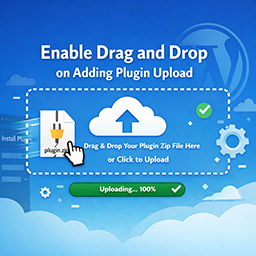
Enable Drag and Drop on Adding Plugin Upload — Enables drag-and-drop ZIP file uploads directly on the WordPress plugin installer page (plugin-install.php).