
기타 워드프레스 통합
REEID Translate에 대한 기타 워드프레스 통합
전용 호환성 카테고리에 속하지 않는 워드프레스 플러그인 및 통합에 대한 문서화된 호환성을 살펴보세요.
기타 호환성
다른 워드프레스 통합을 둘러보세요.
보다 광범위한 워드프레스 생태계 전반에서 게시된 호환성 가이드를 찾아보고, 지원되는 방문자용 콘텐츠가 다국어 워크플로우에 어떻게 참여하는지 검토해 보세요.

Block Widgets Monster
Block Widgets Monster — Provides pre-configured instances of WordPress legacy widgets for testing purposes

Block X-ray Attributes
Block X-ray Attributes — It adds a dedicated 'Block X-ray' section to the Document sidebar in the WordPress editor.

Blocked in China | Check if your site is available in the Chinese mainland
Blocked in China | Check if your site is available in the Chinese mainland — Checks site availability from mainland China via API using multiple regional probe servers
Blocklingo
Blocklingo — Multilingual content management with per-language URLs, translation groups, and automatic WordPress/theme/plugin language file installation

Blockrush API Request Diagnostics
Blockrush API Request Diagnostics — Monitors outbound HTTP requests initiated via WordPress core functions (wp_remote_get, wp_remote_post) and compatible plugins.

Blocks – Reusable Content, Shortcodes & Site Variables
Blocks – Reusable Content, Shortcodes & Site Variables — Creates reusable WordPress content blocks that are managed once and displayed in multiple placements via a shortcode (e.g., `[block id="42"]`).

Blocks Everywhere
Blocks Everywhere — Replaces the default editor for comments, bbPress, and BuddyPress with Gutenberg block editor.

Blocks Scanner
Blocks Scanner — scans and lists Gutenberg blocks used across posts, pages, custom post types, and patterns.

Blocksolid Snippets
Blocksolid Snippets — Manages reusable “snippets” of content via a dedicated custom post type.

blockstylist eSIM Catalog
blockstylist eSIM Catalog — Provides an admin dashboard for managing eSIM plan details including destination, price, and data information.
BlockUX Workflow – Upgrade the WordPress Block Editor
BlockUX Workflow – Upgrade the WordPress Block Editor — Adds editor-side UX improvements to the native WordPress block editor, including cleaner block highlights for structure readability.

Blog AI summarize
Blog AI summarize — Adds a customizable block to single posts for AI-powered article summarization

Blog Automator
Blog Automator — AI-powered blog post generation using OpenAI API

Blog Designer
Blog Designer — Creates and displays blog layouts via the shortcode [wp_blog_designer].
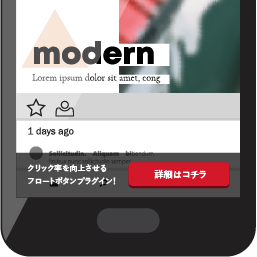
Blog Floating Button
WordPress plugin for customizable floating buttons with desktop/mobile design settings, display targeting, click tracking, and per-button destination links.

Blog Importer for HubSpot
Blog Importer for HubSpot — Connects to HubSpot via the HubSpot CMS API (api.hubapi.com) using a user-provided HubSpot Private App Access Token for authentication.

Blog Porter – Blog Migration Importer
Blog Porter – Blog Migration Importer — Migrates blog posts from Wix, Blogger, Medium, Squarespace, Webflow, and HubSpot directly into WordPress without requiring manual XML exports.

Blog Post Reading Time
Blog Post Reading Time — Displays estimated reading time for blog posts using an adjustable words-per-minute (WPM) calculation.

Blog Yazılarını Sosyal Medyada Otomatik Paylaşın – Plexorin
Blog Yazılarını Sosyal Medyada Otomatik Paylaşın – Plexorin — Automatically publishes WordPress blog posts to connected social media accounts upon post publication or update.

BlogBotz – AI Blog Automation
BlogBotz – AI Blog Automation — Official plugin information documents its primary functionality.

Blogbutler.ai Import
Blogbutler.ai Import — Imports blog post content from external JSON feed URLs into WordPress

BlogDog Connector
BlogDog Connector — Synchronizes articles from BlogDog to WordPress via API connection

Blogent Connector
Blogent Connector — Receives authenticated inbound webhook requests from Blogent SaaS and publishes WordPress posts from the webhook payload (it does not generate content itself).

Blogger Import Wizard – Blogger to WordPress Importer
Blogger Import Wizard – Blogger to WordPress Importer — Supports Blogger to WordPress migration via public URL or XML backup file (feed.atom/blog-*.xml) without requiring API credentials