
REEID 兼容性目录
探索 WordPress 产品及其 REEID Translate 兼容性。
浏览 WordPress 插件、主题、页面构建器及产品生态,获取针对 REEID Translate Pro 的兼容性状态和集成详情。
已验证的集成 · 兼容性信息 · 待验证的产品 · 可搜索的目录
目录的工作方式
由单一来源管理的兼容性信息。
查找与您的 WordPress 技术栈相关的产品,并查看其当前的 REEID 兼容性状态。
- 按产品名称搜索
- 浏览兼容性状态
- 查看可用的集成指南
已发布的兼容性指南
使用REEID Translate探索WordPress生态系统。
按产品名称搜索,查看兼容性状态、可用的集成文档以及支持的多语言工作流程。

Draft Concluder
Draft Concluder — Sends scheduled email reminders to users with outstanding draft posts and pages.

Draft Graveyard
Draft Graveyard — Adds a WordPress Dashboard widget listing up to five user-owned drafts untouched for over seven days

Draft Links
Draft Links — Adds custom links to the WordPress Admin menu for direct access to draft posts and pages

Draft List
Draft List — Displays lists of draft and scheduled posts using a configurable shortcode

Draft Order Control
Draft Order Control — Stops new block checkout draft orders by creating them as Pending instead of draft.

Draft Post Generator
Draft Post Generator — Bulk creation of draft posts or pages from newline-delimited title lists

Draft2Live Connect
Draft2Live Connect — One-click pairing to Draft2Live using WordPress Application Passwords (Connect to Draft2Live in plugin settings, approve via native Application Password prompt).

Draft2Publish – AI Content Writer, Autoblogger & Image Generator
Draft2Publish – AI Content Writer, Autoblogger & Image Generator — {"text": "AI content generation via Google Gemini API using user-provided keys", "evidence": "Connect your own Google Gemini API key and pay Google directly for API usage. Draft2Publish adds no token markup.", "source_url": "https://wordpress.org/plugins/draft2publish/"}

DraftBridge: From Doc/Docx to Blog Post
DraftBridge: From Doc/Docx to Blog Post — Imports content from Google Docs and .docx files into WordPress posts or pages.

Draftcamp Publisher
Draftcamp Publisher — Secure connection-key authentication with SHA-256 hashing

DraftCraft
DraftCraft — , Auto-populates focus keywords, SEO titles, and meta descriptions for Rank Math, Yoast SEO, and All in One SEO (AIOSEO).

Draftdrop – Markdown Importer with Front Matter & SEO Fields
Draftdrop – Markdown Importer with Front Matter & SEO Fields — Parses Markdown front matter to extract SEO metadata including title, slug, category, tags, excerpt, SEO title, meta description, focus keyphrase, and featured image details.

DraftFence AI Review
DraftFence AI Review — Enforces human-in-the-loop approval workflows for AI-generated content edits and SEO updates.

DraftForge – AI Draft Poster
DraftForge – AI Draft Poster — Generates structured blog post drafts including title, HTML body, categories, and tags from a single topic input

DraftLab AI – Bulk Description Generator & Product Creator for WooCommerce
DraftLab AI – Bulk Description Generator & Product Creator for WooCommerce — Generates SEO-optimized WooCommerce product descriptions in bulk for existing products.

DraftPilot AI Site Editor
DraftPilot AI Site Editor — Turns one sentence about your business into a complete, editable website

DraftSEO.ai
DraftSEO.ai — Maintains compatibility with Yoast SEO, Rank Math, All in One SEO, and SEOPress by writing SEO title, meta description, focus keyword, and canonical URL directly to the active plugin.

Draftsmith AI Content Assistant
Draftsmith AI Content Assistant — Generates and saves SEO meta descriptions directly within the post editor sidebar.

DraftSync Lite
DraftSync Lite — A self-hosted local writing workspace for posts, pages, and selected public post types that stores content, comments, version history, and presence data directly as WordPress post metadata.

Drag & Drop Featured Image Improved
Drag & Drop Featured Image Improved — Replaces the default WordPress featured image metabox with a drag-and-drop interface using Plupload.

Drag & Drop Menu Items
Drag & Drop Menu Items — Enables adding navigation menu items via drag-and-drop interaction within the WordPress Menus interface.
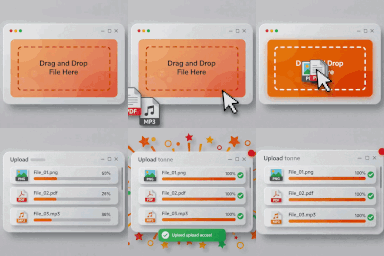
Drag and Drop File Upload for Contact Form 7
Drag and Drop File Upload for Contact Form 7 — Replaces the standard file upload field with a “Drag and Drop” area for Contact Form 7.
Drag and Drop File Upload for Elementor Forms
Drag and Drop File Upload for Elementor Forms — Adds a drag-and-drop or multiple-file upload area to Elementor Forms.

Drag and Drop Multiple File Upload for Contact Form 7
Drag and Drop Multiple File Upload for Contact Form 7 adds a multi-file upload field to Contact Form 7 and supports translation of the form text surfaces it explicitly exposes.