
REEID 兼容性目录
探索 WordPress 产品及其 REEID Translate 兼容性。
浏览 WordPress 插件、主题、页面构建器及产品生态,获取针对 REEID Translate Pro 的兼容性状态和集成详情。
已验证的集成 · 兼容性信息 · 待验证的产品 · 可搜索的目录
目录的工作方式
由单一来源管理的兼容性信息。
查找与您的 WordPress 技术栈相关的产品,并查看其当前的 REEID 兼容性状态。
- 按产品名称搜索
- 浏览兼容性状态
- 查看可用的集成指南
已发布的兼容性指南
使用REEID Translate探索WordPress生态系统。
按产品名称搜索,查看兼容性状态、可用的集成文档以及支持的多语言工作流程。

Re:Likes
Re:Likes — Allows readers to apply Like or Dislike reactions to specific text passages within posts, pages, custom post types, and approved comments.

Re{code} Front HTML Editor
Re{code} Front HTML Editor — Adds a fixed frontend toolbar for direct HTML editing of post_content without page reloads

ReachDeck Toolbar
ReachDeck Toolbar — Provides text-to-speech functionality with adjustable reading speeds and highlighters

Reacho – Free Customer Support Plugin for WooCommerce
Reacho – Free Customer Support Plugin for WooCommerce — WooCommerce integration for customer support operations

ReachShip WooCommerce Multi-Carrier & Conditional Shipping
ReachShip WooCommerce Multi-Carrier & Conditional Shipping — Provides real-time shipping rates and estimated delivery dates for WooCommerce customers.

Reactflow Visitor Recording and Heatmaps
Reactflow Visitor Recording and Heatmaps — Records and replays visitor sessions including mouse clicks, movements, scrolls, and touch taps as video-like playback

Reactify – Post Reactions, Emoji Reactions & Engagement Analytics for WordPress
Reactify – Post Reactions, Emoji Reactions & Engagement Analytics for WordPress — Adds customizable emoji and reaction buttons to WordPress posts for visitor engagement.

ReactPress – Create React App for WordPress
ReactPress – Create React App for WordPress — Embeds a React app into one or more WordPress pages, configuring the React app to work within the WordPress environment (hosted inside WordPress rather than a separate web server).

Read Holy Quran
Read Holy Quran — Embeds external Quran reading interface via quranflash.com

Read More Button – Expand Content Without Refresh
Read More Button – Expand Content Without Refresh — Automatically truncates post and page content after a configurable number of lines or characters.

Read More Excerpt Link
Read More Excerpt Link — Replaces WordPress’ default excerpt ellipsis (“[...]”) with a “Read More” link pointing to the full post content.

Read More Toggle Block
Read More Toggle Block — Adds a custom block to the WordPress block editor for creating expandable and collapsible content sections.
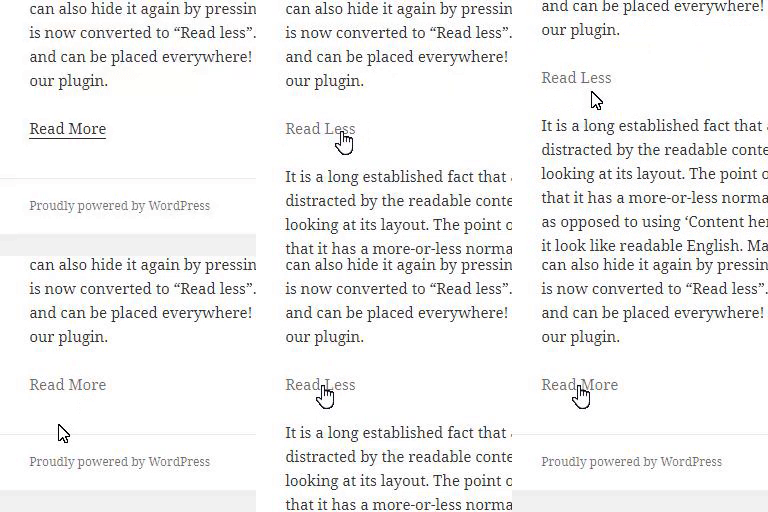
Read More Without Refresh
Read More Without Refresh — Expands and collapses hidden content without a page refresh using a shortcode or block.

Read More WP
Read More WP — Hides content using shortcodes with a toggle button to show more or less.

Read Only Fields for Gravity Forms
Read Only Fields for Gravity Forms — Adds a “Read Only” checkbox to supported Gravity Forms fields in the form editor

Read Sample
Read Sample — Adds a customizable 'Read Sample' button to WooCommerce single product pages.

ReadBar – Smart Reading Time & Dynamic Progress Bar
ReadBar – Smart Reading Time & Dynamic Progress Bar — Calculates estimated reading time using multibyte-safe word counting for Unicode languages (Bengali, Hindi, Arabic, Chinese, Japanese, Korean) and optionally adds time for media and code.

ReadEase: Text Resizer
ReadEase: Text Resizer — A native Gutenberg block allowing site visitors to resize text for improved readability and accessibility.

Reader's Web Publisher
Reader's Web Publisher — Serves WordPress content in HDOC, CDOC, and CONDOC document formats

ReaderNova Reading Mode
ReaderNova Reading Mode — Provides a distraction-free reading overlay with configurable button styles, positions, and icons

Reading Position Indicator
Reading Position Indicator — , displays a horizontal progress bar on posts and pages to indicate scroll position

Reading progressbar
Reading progressbar — Displays a reading-position indicator as a progress bar.

Reading Time
Reading Time — {"task": "Research factual plugin behavior for compatibility context only. Do not extract translation-surface observations.", "plugin_identity": {"name": "Reading Time", "slug": "reading-time", "homepage_url": "https://www.whiletrue.it", "plugin_url": "https://www.whiletrue.it"}, "official_search_domains": ["whiletrue.it", "wordpress.org", "plugins.svn.wordpress.org"], "rules": ["Return one JSON object only.", "Use only facts supported by supplied plugin evidence or web research from the allowed official domains.", "Use web search only when supplied evidence is insufficient.", "For web research, use only first-party vendor/product documentation and WordPress.org sources within official_search_domains.", "Do not use reviews, blogs, forums, aggregators, search snippets, or third-party documentation as evidence.", "Do not invent plugin behavior, capabilities, settings, or integrations.", "Do not decide REEID compatibility, translation support, approval, or eligibility.", "Follow category_research.rules for what to investigate in this Integration Category.", "Return observations as an empty list.", "Return 4 to 8 concise high-value factual capabilities in features.", "Group related implementation details into broader capability statements.", "Prefer stable product capabilities over minor settings or repeated variations.", "Do not include ratings, installation counts, version requirements, or promotional claims.", "Use unknowns only for materially relevant facts that official evidence does not establish.", "seo_display_name must be the shortest distinctive search-facing product or brand identity that can be copied exactly as one contiguous phrase from plugin_identity.name. Preserve the exact capitalization, spelling, and punctuation used in plugin_identity.name. Never invent, rename, expand, normalize, lowercase, or substitute the plugin brand. Remove generic leading or trailing descriptors when a shorter distinctive product or brand phrase is present, including terms such as Plugin, WordPress Plugin, Page Builder, Website Builder, WooCommerce, Forms, SEO, Addons, Widgets, Templates, Booking, Membership, or similar category/marketing wording. The distinctive brand may appear at the beginning, middle, or end of plugin_identity.name; for example, a title shaped like generic description – Brand should return Brand when Brand is clearly the product identity. When a short distinctive acronym, product token, or branded abbreviation appears after a separator and clearly identifies the plugin, prefer that exact token over the preceding generic description; for example Database Addon for Contact Form 7 – CFDB7 should return CFDB7. Use plugin_identity.slug only as an identity clue, not as output text unless that exact casing and phrase also appears in plugin_identity.name. If no shorter distinctive product or brand phrase can be selected safely, return the full plugin_identity.name.", "seo_keyword_candidates must contain 2 to 4 concise plugin-specific identity phrases based on seo_display_name, plugin_identity.name, and plugin_identity.slug. When the slug corresponds to a brand or product phrase present in the official name, include that phrase as a candidate. Do not return generic category-only phrases and do not assert REEID compatibility, verification, translation support, or other unsupported state claims."], "category_research": {"integration_category": "Other", "mode": "compatibility_only", "rules": ["Research concise factual plugin behavior from official sources for compatibility context without assuming any translation surface.", "This Integration Category is compatibility-only.", "Do not research, infer, or emit translation-surface observations.", "Return observations as an empty list.", "Use features and unknowns only for factual compatibility context."], "evidence_focus": {"integration_category": "Other", "look_for_literal_terms": []}}, "output_schema": {"observations": [{"text": "", "evidence": "", "source_url": ""}], "features": [], "unknowns": [], "seo_display_name": "", "seo_keyword_candidates": []}, "evidence": {"description": "Reading Time shows the estimated reading time of the post, in seconds or minutes.\nThe estimate is automatic; a custom value for a single post can be inserted using a Custom Field named “readingtime”.\n For more info: https://www.whiletrue.it/reading-time-for-wordpress/", "sections": {"installation": "Upload reading_time.php and unisntall.php into the /wp-content/plugins/reading_time directory\n Set your favourite values in the Settings->Reading Time menu in WordPress\n Activate the plugin through the Plugins menu in WordPress\n Enjoy!", "faq": "How is the estimation done?\n The estimation is based on the “speed” value stored in the settings menu.\nThe value for speed should be chosen between a span of 150 words per minute (slightly slower than average) to 250 words per minute (slightly higher than average); if not set, a default value of 200 is used.", "screenshots": "Sample content with the progress bar almost filled"}, "readme_text": "=== Reading Time ===\nContributors: whiletrue\nDonate link: https://www.whiletrue.it/\nTags: reading time, estimate time, reading, time, word count \nRequires at least: 2.9+\nRequires PHP: 7.4\nTested up to: 7.1\nStable tag: 1.2.21\n\nReading Time shows the estimated reading time and puts an animated progress bar inside the post. \n\n== Description ==\nReading Time shows the estimated reading time of the post, in seconds or minutes. \nThe estimate is automatic; a custom value for a single post can be inserted using a Custom Field named \"readingtime\".\n\nFor more info: https://www.whiletrue.it/reading-time-for-wordpress/\n\n== Installation ==\n1. Upload `reading_time.php` and `unisntall.php` into the `/wp-content/plugins/reading_time` directory\n2. Set your favourite values in the `Settings->Reading Time` menu in Wordpress\n3. Activate the plugin through the `Plugins` menu in WordPress\n4. Enjoy!\n\n== Frequently Asked Questions ==\n= How is the estimation done? =\nThe estimation is based on the \"speed\" value stored in the settings menu.\nThe value for speed should be chosen between a span of 150 words per minute (slightly slower than average) to 250 words per minute (slightly higher than average); if not set, a default value of 200 is used.\n\n== Screenshots ==\n1. Sample content with the progress bar almost filled"}}
Reading Time & Word Count Block for Post
Reading Time & Word Count Block for Post — Dynamically calculates and displays estimated reading time based on a fixed average speed of 200 words per minute.